TECHNICAL CASE STUDY

LEFTOVERACHIEVEMENTS

A dedicated RetroAchievements dashboard running on a Raspberry Pi display.

My brother and I compete for high scores on RetroAchievements. I wanted a way to keep track of what he was playing, how our scores were changing, and who was gaining ground each week without constantly checking the site.

LeftoverAchievements turns that idea into a dedicated Raspberry Pi display with a local dashboard, live achievement updates, historical tracking, rankings, and an update system that helps it behave more like an appliance than a normal computer.

ROLE
Sole Developer
STATUS
Active
HARDWARE
Raspberry Pi 4
7-inch DSI Touch Display
STACK
Python · FastAPI · SQLite · JavaScript · Jinja · systemd · GitHub Actions

Also packaged for macOS and Windows.

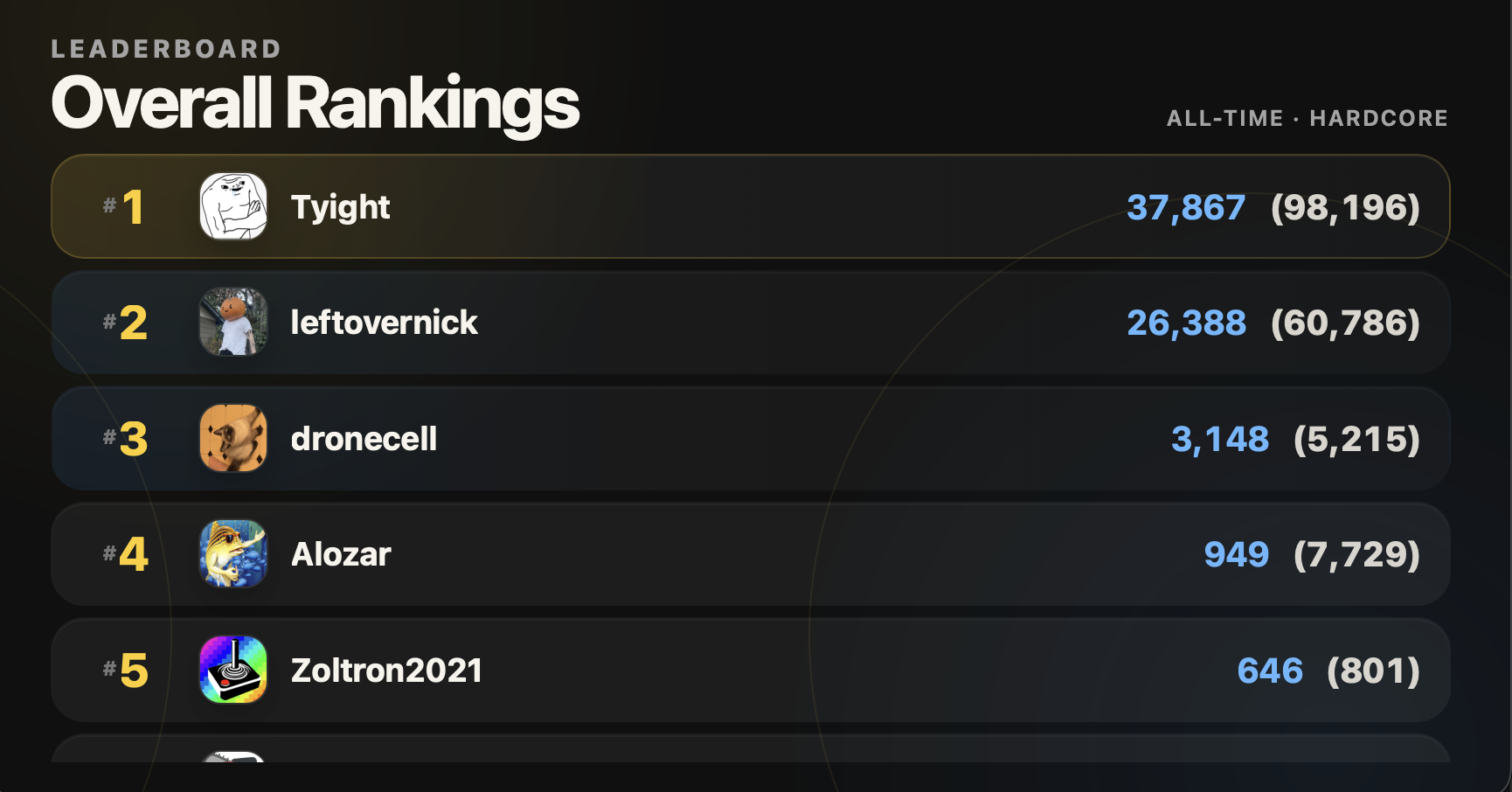
FULLSCREEN DISPLAY

LIVE INTERFACE
LeftoverAchievements fullscreen display showing the overall RetroAchievements rankings
The current appliance uses a seven-inch touchscreen, but the layout responds to the available screen size and also works in resizable desktop windows.

OVERVIEW

Built to live on a desk, not in a browser tab.

LeftoverAchievements was always meant to be something physical. The Raspberry Pi runs the backend, stores local state, talks to RetroAchievements, and drives a fullscreen Chromium display. The same application serves a LAN dashboard for setup, administration, charts, history, and player management.

The display rotates through overall and weekly rankings, current games, and recent activity, then interrupts that cycle when somebody earns an achievement, beats a game, or reaches mastery. Later, I expanded the same system into packaged desktop runtimes for notifications and a dedicated window.

The intended boundary is a trusted LAN. The dashboard is not designed as an authenticated, TLS-terminated internet service.

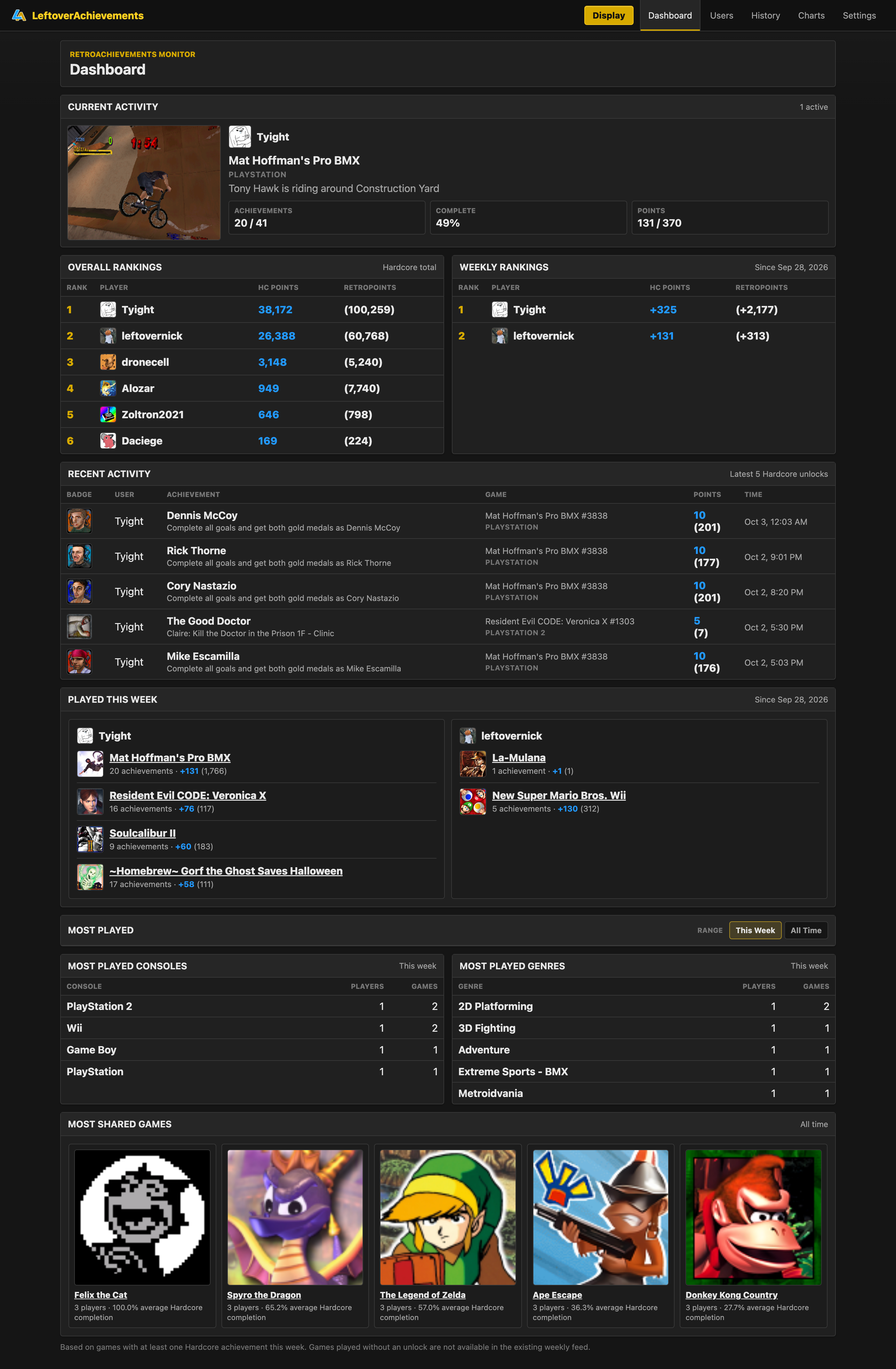
FULL LAN DASHBOARD

LIVE INTERFACE
Complete LeftoverAchievements LAN dashboard showing current activity, rankings, recent achievements, weekly play, popular consoles and genres, and shared games
The complete browser view brings current activity, rankings, recent unlocks, weekly play, and group trends into one denser interface while the fullscreen display stays focused on glanceable information.

SYSTEM STRUCTURE

One application handles the data, display, and device lifecycle.

I kept the core as one FastAPI application. It handles polling, storage, the server-rendered admin screens, JSON APIs, and the display event stream. There is no SPA framework or network of microservices to coordinate.

Jinja renders the dashboard, plain JavaScript handles interaction, and a vendored copy of Chart.js keeps the charts local. SQLite sits behind both the interactive views and the background work.

  • FastAPI / Uvicorn backend
  • SQLite persistence
  • Server-rendered Jinja
  • Plain JavaScript
  • Local Chart.js
  • SSE display events

SYSTEM MAP

A modular monolith with two external boundaries

EXTERNAL DATARetroAchievements API
→
APPLICATIONFastAPI backendpolling · normalization · lifecycle
→
PERSISTENCESQLite22 tables
JINJA DASHBOARDLAN setup, charts, history
JSON APIs44 FastAPI routes total
SSE /DISPLAY/EVENTSFullscreen Chromium display
RELEASE SOURCEGitHub Releases
→
DEVICE LIFECYCLEStage · activate · roll back

RASPBERRY PI APPLIANCE

The Raspberry Pi is the product environment.

The Pi does not boot into a normal desktop workflow. systemd starts the backend while LightDM independently enters a project-specific labwc session. Chromium launches in kiosk mode with its own browser profile, suppressed prompts, and a supervised restart loop.

The graphical session and backend do not always become ready at the same moment, so Chromium opens a small local loading page first. That page checks 127.0.0.1:8000 and moves to /display when the service responds. This lets the display and backend start separately without breaking startup.

  • Chromium kiosk mode
  • Dedicated browser profile
  • Supervised restart loop
  • Cursor hidden only in the appliance session
  • Local display on 127.0.0.1
  • LAN dashboard exposed separately

BOOT SEQUENCE

Two startup paths meet at readiness

01

PI BOOT

Raspberry Pi OS starts normally

02

SYSTEMD

Starts the FastAPI backend

03

LIGHTDM

Logs into a project-specific session

04

LABWC

Creates the private kiosk environment

05

CHROMIUM

Opens a local readiness page

06

/DISPLAY

Takes over when the backend responds

The readiness page absorbs the race between the service and graphical session; neither has to pretend the other starts synchronously.

LIVE DISPLAY

The display is a carousel until something happens.

The passive display cycles through overall ranking, weekly ranking, current games, and recent activity. It was built for the current seven-inch appliance, but it is not locked to that screen: the layout responds to any browser or desktop-app window size and orientation, changing density, scale, and visible content as the viewport moves.

When polling detects an achievement, beaten game, or mastery, SSE pushes a local event that interrupts the carousel with a focused overlay and its configured sound. Individual slides can be replaced without reloading the entire display.

Touch controls let me jump to the information I want, pause the rotation, change its speed, adjust audio, or scale the interface without waiting for the timed cycle.

  • Fluid viewport scaling
  • Portrait and landscape layouts
  • Timed carousel
  • Oversized-list scrolling
  • Achievement / beaten / mastery overlays
  • Swipe and edge controls

LIVE EVENT INTERRUPTS

LIVE INTERFACE
LeftoverAchievements display showing achievement earned, game beaten, and game mastered interruption overlays
Achievement, game-beaten, and mastery events temporarily take over the idle carousel with distinct focused states. The recording demonstrates the visual sequence only; optional default, generated, or custom alert audio is not included.

RESPONSIVE DISPLAY SYSTEM

LIVE INTERFACE
LeftoverAchievements display reflowing as a desktop window is resized across different dimensions and orientations
The same display view reflows inside a resizable desktop window, adjusting typography, spacing, row density, and composition instead of assuming a fixed seven-inch canvas.

RETROACHIEVEMENTS DATA FLOW

Polling without hammering the API.

RetroAchievements does not push these events to the application. LeftoverAchievements detects them by polling, so external requests are serialized and spaced at least 0.75 seconds apart. A 429 response respects Retry-After instead of immediately trying again.

Tracked users are distributed through polling slots. The achievement loop aims to cover everyone in roughly 60 seconds, while current activity covers all users inside its 75-second cache interval. Weekly rankings and other slower-changing data use different cache lifetimes.

Failures preserve useful cached data. On a fresh installation, the first successful pass records existing achievements as a baseline instead of replaying years of old unlocks as new live events.

  • Serialized external traffic
  • Retry-After handling
  • User polling slots
  • Per-dataset cache lifetimes
  • Cached-data fallback
  • First-run event baseline

POLLING PIPELINE

One controlled path from API to display

01

RETROACHIEVEMENTS

7 API endpoints

↓
02

RATE-LIMITED POLLER

Serialized · ≥ 0.75s spacing

↓
03

NORMALIZATION

Different cache lifetimes

↓
04

SQLITE + CACHE

Useful data survives failures

↓
05

DASHBOARD + SSE

Views and local live events

PLAYER MANAGEMENT

LIVE INTERFACE
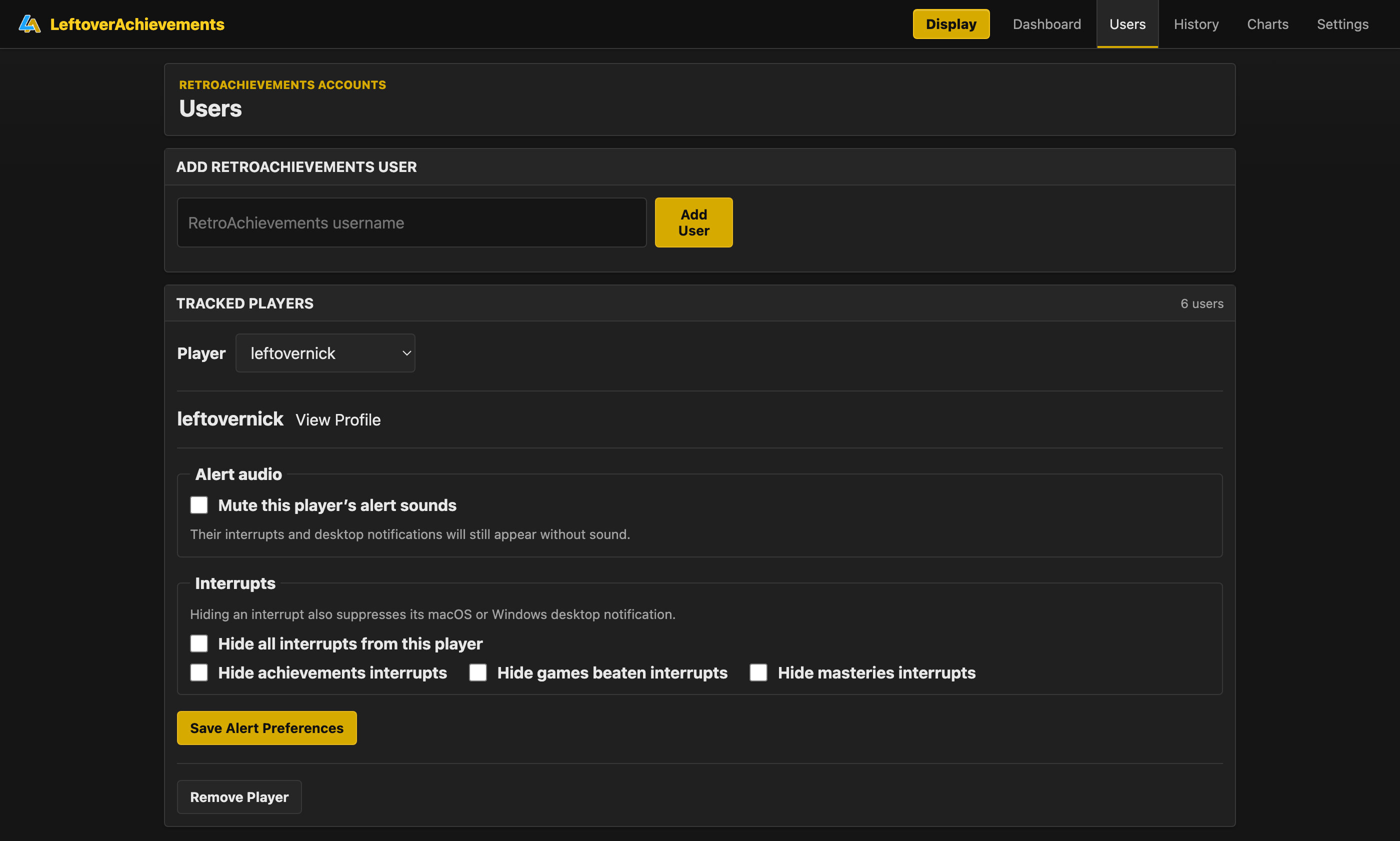
Complete LeftoverAchievements users page for adding players and configuring per-player alert audio and display interrupts
Tracked accounts share the polling pipeline, while alert audio and achievement, beaten-game, and mastery interruptions can be configured per player.

LIVE EVENTS & RESTARTS

A live display still has to shut down cleanly.

/display/events uses a long-lived SSE connection. That is useful while the display is running, but a persistent stream can delay Uvicorn shutdown during an update or service restart.

The launcher now sends a shared shutdown event before Uvicorn starts waiting. Each SSE stream watches its subscriber queue, that shutdown signal, and a heartbeat timeout. During shutdown it closes the stream and cancels outstanding waits. Chromium’s EventSource reconnects when the backend returns, while Uvicorn and systemd keep their timeout fallbacks.

  • Shared shutdown event
  • Subscriber queue
  • Heartbeat timeout
  • Outstanding-task cancellation
  • EventSource reconnection
  • Bounded process timeouts

RESTART LIFECYCLE

Close the stream, restart, reconnect

01

UPDATE OR RESTART

→
02

SET SHUTDOWN EVENT

→
03

SSE STREAM EXITS

→
04

UVICORN RESTARTS

→
05

EVENTSOURCE RECONNECTS

The display loses its connection briefly, but it does not need a coordinated page reload or a special recovery screen.

PROFILES & HISTORICAL DATA

The API data becomes a clearer picture of progress.

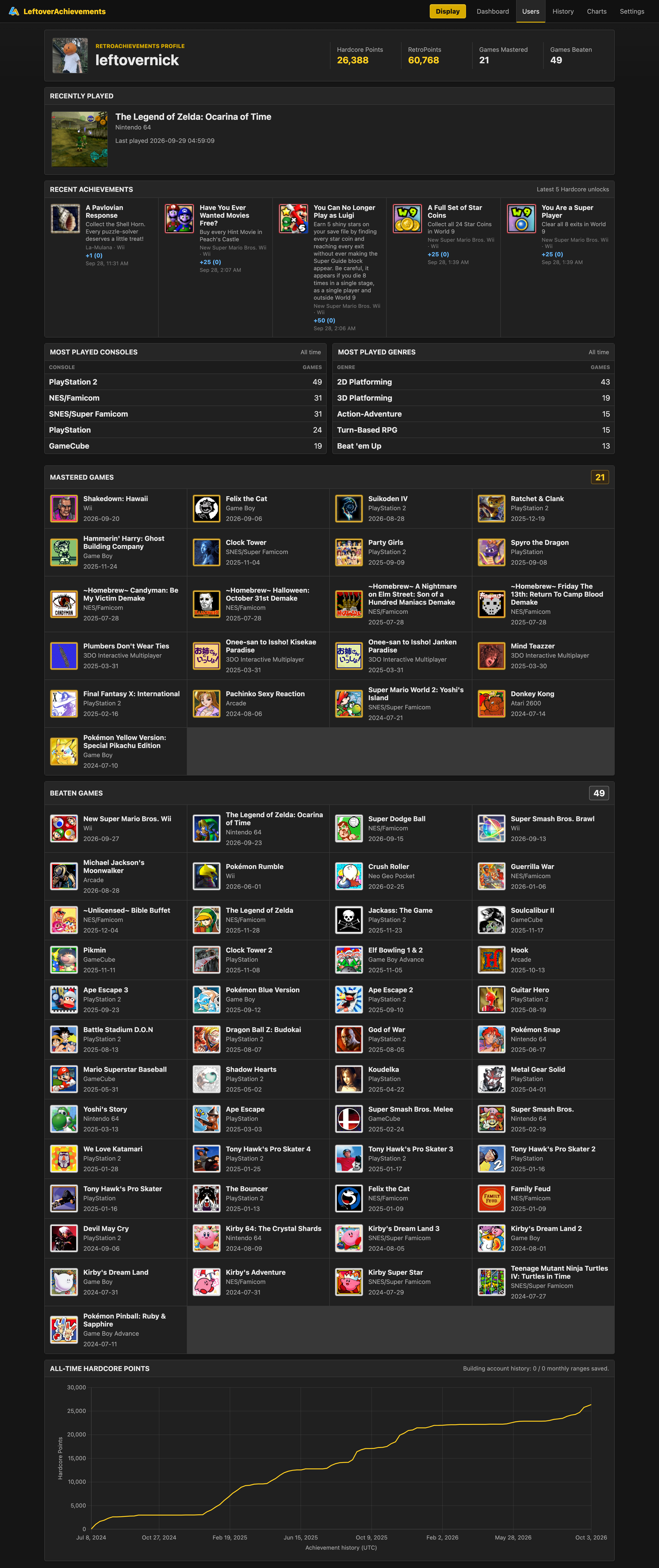
The RetroAchievements API is the source, but I did not want to copy the entire site. Each player profile keeps the parts I care about together: current totals, recently played games, recent unlocks, preferred consoles and genres, mastered and beaten games, and a personal progression chart.

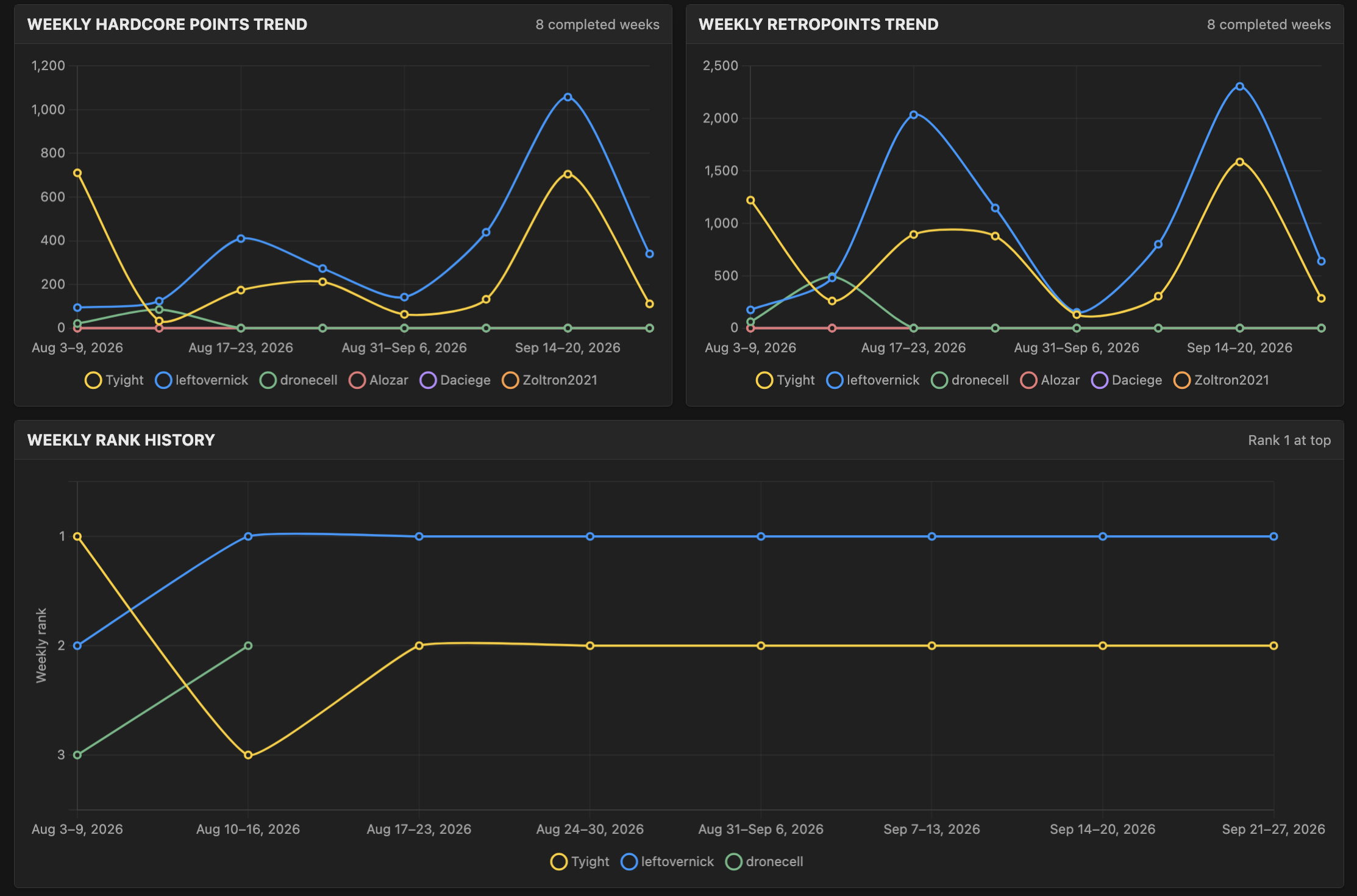
The shared charts answer questions that RetroAchievements does not surface. They compare tracked players’ weekly Hardcore Points and RetroPoints, preserve weekly rank history, and show group patterns such as achievements earned by day of the week or month.

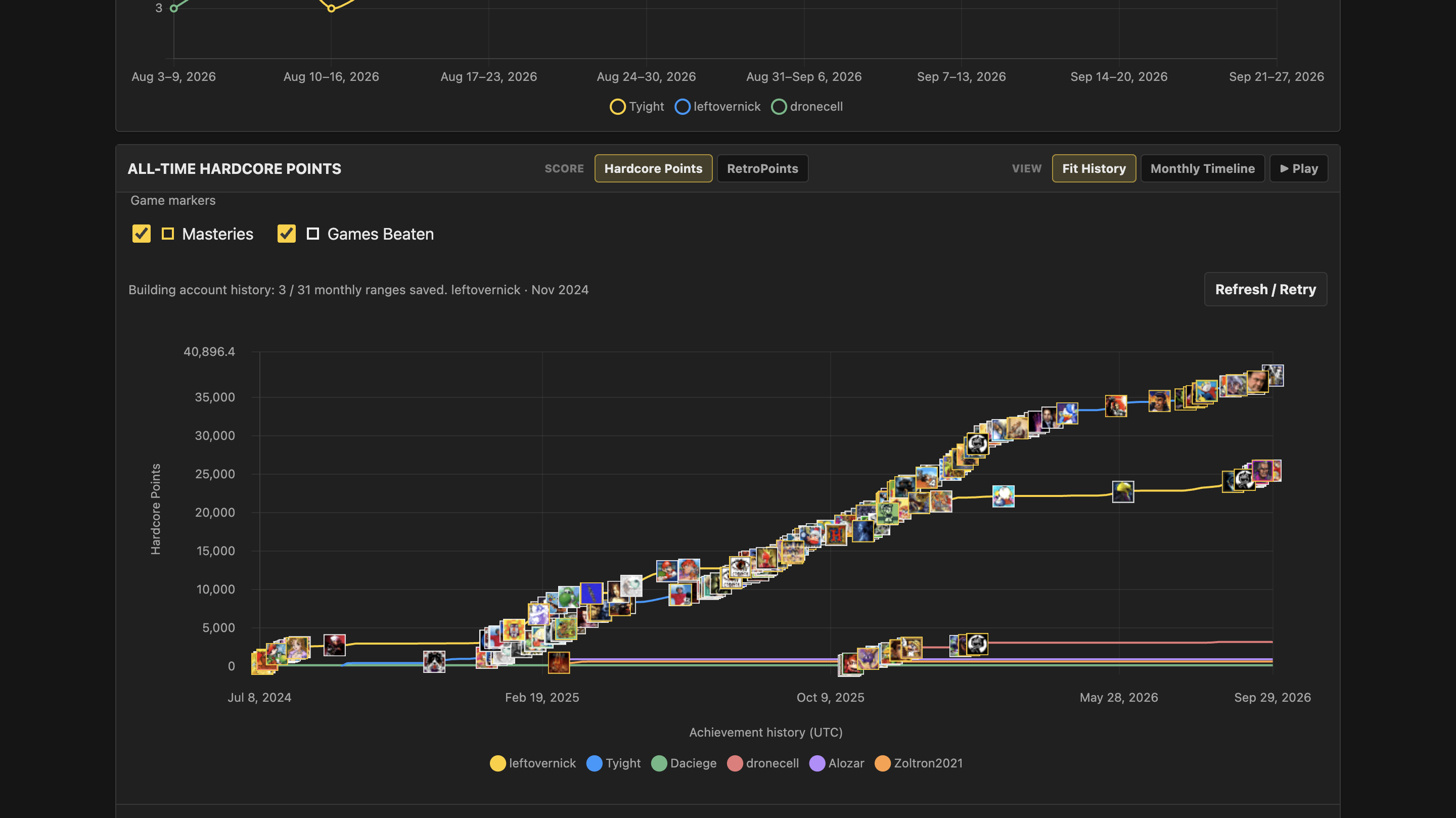
The same history can be played in two ways. An all-time animation shows each player’s score and game milestones across the full history, while the monthly timeline moves through one month at a time.

Those views need more than one API response. The app requests achievement history in monthly ranges and stores each completed chunk, so interrupted work can resume. Weekly snapshots and group charts are then built from that shared history.

The reconstructed curves use dated unlocks and current point values, so they are not perfect historical snapshots. Removed achievements or past point-value changes cannot be reproduced exactly; the interface states that limitation instead of implying precision the source data cannot provide.
  • Condensed player profiles
  • Recent progress snapshots
  • Personal accomplishment history
  • Cross-player weekly comparisons
  • Group activity patterns
  • Resumable monthly history chunks

CONDENSED PLAYER PROFILE

LIVE INTERFACE
Complete LeftoverAchievements player profile with current totals, recent games and achievements, console and genre summaries, mastered and beaten games, and a personal progression chart
A focused personal view strips away the rest of the RetroAchievements site and keeps current progress, recent activity, overall accomplishments, and an individual progression curve together.

WEEKLY GROUP ANALYTICS

LIVE INTERFACE
LeftoverAchievements weekly analytics comparing tracked players’ Hardcore Points, RetroPoints, and rank history
These charts compare weekly Hardcore Points and RetroPoints and keep a history of rank changes. RetroAchievements does not provide these views.

WEEKLY SNAPSHOTS

LIVE INTERFACE
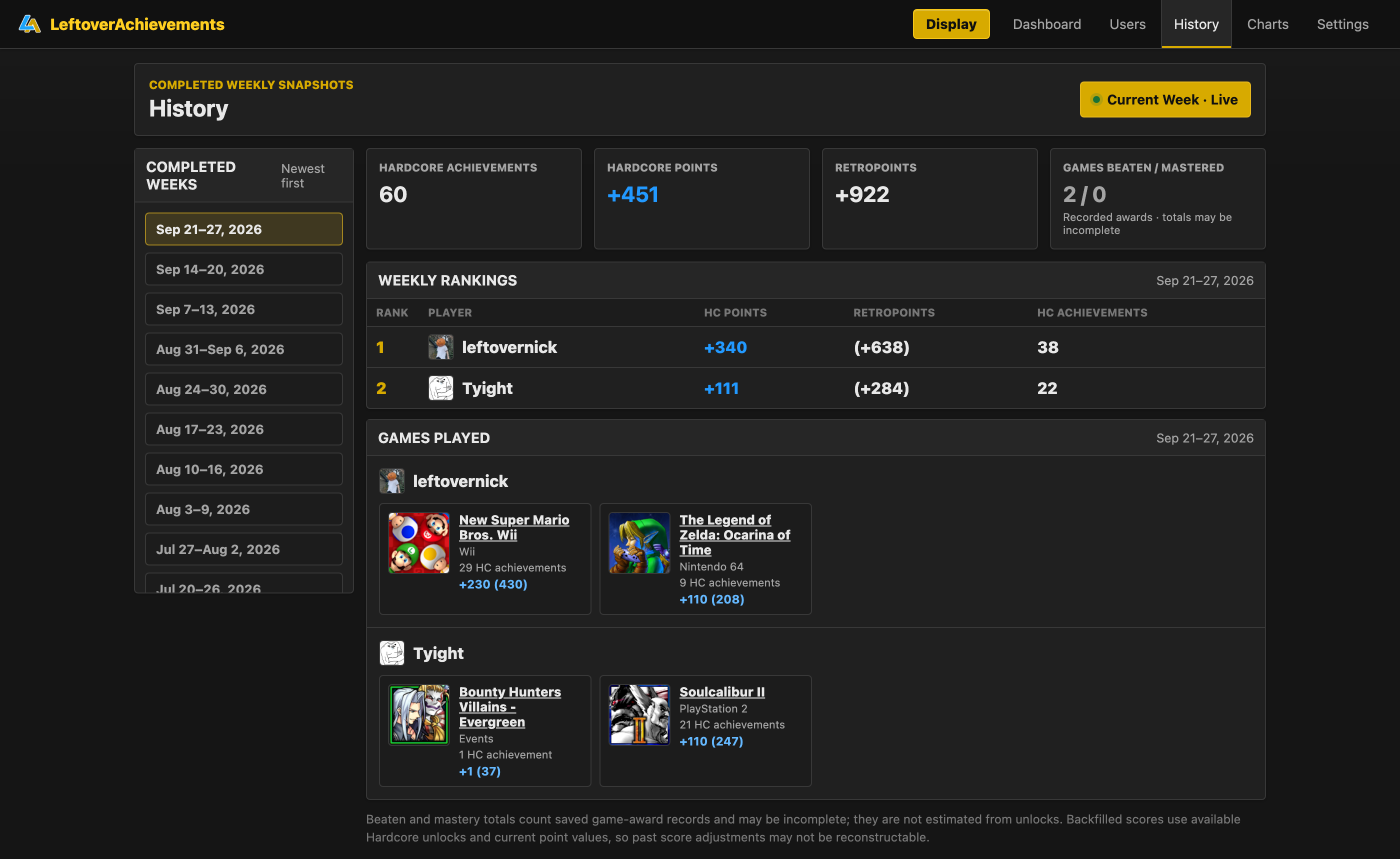
Complete LeftoverAchievements weekly history page with saved week selection, rankings, totals, and games played
Completed weeks are rebuilt from the shared historical store, preserving rankings, score changes, and games played separately from the current live week.

ALL-TIME PROGRESSION

LIVE INTERFACE
Animated LeftoverAchievements all-time timeline comparing tracked players’ reconstructed score progression
The all-time animation turns dated unlocks into a comparative long-term view, showing how scores accumulated and where games were beaten or mastered.

MONTHLY TIMELINE

LIVE INTERFACE
Animated LeftoverAchievements monthly timeline moving through tracked players’ score progression one month at a time
The monthly mode follows the same reconstructed history in focused windows, making individual unlocks and game milestones easier to inspect as the timeline advances.

SAFE RELEASES & UPDATES

An appliance should not be left half-updated.

Publishing a GitHub Release starts platform builds. The application can detect that release, but it never installs it silently: the user chooses when to install. On the Pi, the package is downloaded and validated in staging before a new release-specific virtual environment is built.

Activation is one atomic symlink change. If the restart or a system migration fails, the symlink moves back to the previous version and that release is restarted. The database, configuration, audio, logs, and update status live outside the versioned release directories, so replacing application code does not replace user state.

The web application is not allowed to execute arbitrary commands as root. A root-owned helper exposes only the specific update and migration actions the release flow needs.

  • User-approved installation
  • Package and path validation
  • Release-specific virtual environments
  • Atomic symlink activation
  • Rollback on restart failure
  • Narrow privileged helper

RELEASE FLOW

Validate first, move one pointer, keep a way back

01

GITHUB RELEASE

Versioned source and release metadata

↓
02

PLATFORM BUILD

Actions creates the Pi package

↓
03

USER APPROVAL

The app offers the release; the user chooses Install

↓
04

STAGING

Download, inspect, validate, and build a new virtual environment

↓
05

ATOMIC ACTIVATE

Move the current symlink to the new release

↓
06

RESTART OR ROLLBACK

Restart the service, or restore the previous symlink

Validation covers package paths, version, architecture, size, and mutable-file exclusions before anything becomes current.

PERSISTENT DIRECTORY MODEL

~/.local/share/LeftoverAchievements/

app/

releases/vX.Y.Z/

current → releases/vX.Y.Z

data/

leftover.db

.env

instance-config.json

audio/

logs/

update-status

Versioned application code can move forward or back while mutable state remains in one stable location.

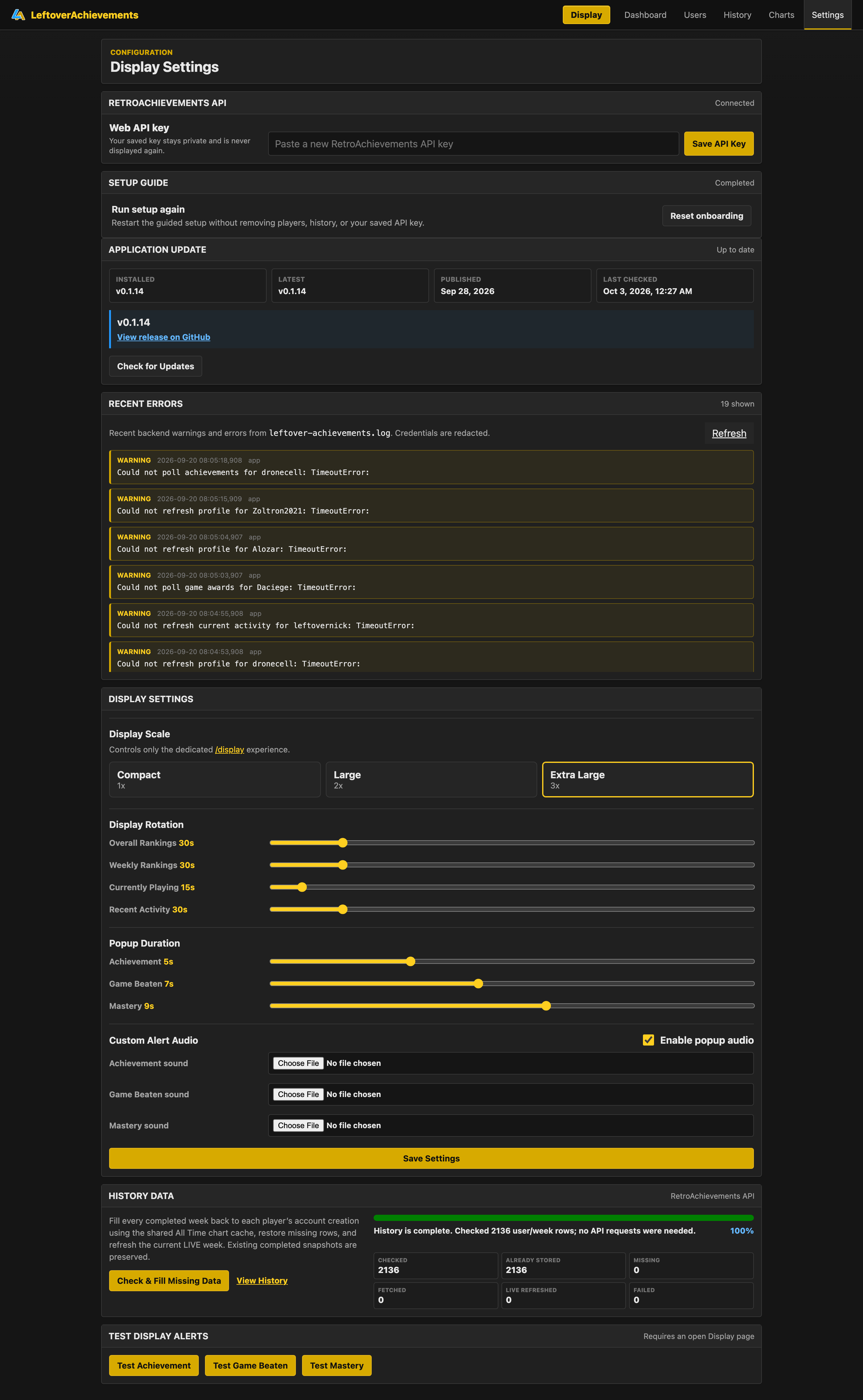
DEVICE ADMINISTRATION

LIVE INTERFACE
Complete LeftoverAchievements settings page with API state, release status, redacted logs, display timing, audio, history maintenance, and test controls
The LAN settings surface keeps release state, redacted backend warnings, display behavior, audio, history maintenance, and alert tests available without exposing a general-purpose system shell.

HUB / CLIENT MODE

Multiple displays should not repeat the same work.

I wanted to minimize duplicate API traffic, especially because RetroAchievements throttles requests. I also did not want every display to require the same setup again.

One installation can act as the hub: it owns the API credentials, polling, and shared data. Client frontends send their requests to that hub and stop their own local polling. A client’s existing SQLite database is retained rather than merged or destroyed, which keeps changing modes reversible.

This is meant for a trusted LAN, not the cloud. It cuts down repeated work across a few installations without adding a distributed backend.

  • One polling owner
  • Shared API credentials
  • Frontend request redirection
  • Client polling disabled
  • Local database retained
  • Trusted-LAN topology

LAN TOPOLOGY

One hub, several ways to look at it

HUB

API credentials + polling + shared data

PI DISPLAYkiosk + touch
MACOSwindow + notifications
WINDOWSwindow + notifications

DESKTOP EXPANSION

The display stopped being the only useful interface.

Once the core system was working, I realized much of it did not depend on the physical display. The same backend could surface native notifications or run in a dedicated desktop window.

Packaged runtimes now target macOS arm64, macOS x64, and Windows x64. One runtime check handles storage paths, ports, processor type, packaging behavior, update support, and native host integration, while the web application stays shared.

macOS supports self-update. Windows detects a new release and directs the user to the matching download rather than claiming an in-place update path it does not have.

  • macOS arm64
  • macOS x64
  • Windows x64
  • Native notifications
  • Dedicated desktop window
  • Shared web application

RUNTIME TARGETS

One application, different platform pieces

SHARED COREFastAPI + Jinja + JavaScript + SQLite
RASPBERRY PI ARM64Kiosk · systemd · self-update
MACOS ARM64 / X64Native host · self-update
WINDOWS X64Native host · download handoff
STORAGE + PORTS
ARCHITECTURE + PACKAGING
UPDATE + HOST CAPABILITY

TESTING & RELEASE PIPELINE

The hardware-specific parts still need to be testable.

The current Python suite contains 24 modules and 171 passing tests. It covers application behavior, package validation, SSE shutdown, alternate configuration roots, and release smoke tests. I also check the provisioning scripts for shell syntax and expected behavior.

GitHub Actions builds Pi ARM64, macOS ARM64, macOS x64, and Windows x64. Each release asset is smoke-tested before upload, so the packaged app has to start successfully, not just the source tree.

  • 24 Python test modules
  • Package validation tests
  • SSE shutdown tests
  • Configuration-root simulations
  • Provisioning checks
  • Artifact smoke tests

RELEASE MATRIX

Four artifacts must pass their own smoke test

01SMOKE TESTED

PI ARM64

Appliance package

02SMOKE TESTED

MACOS ARM64

Packaged runtime

03SMOKE TESTED

MACOS X64

Packaged runtime

04SMOKE TESTED

WINDOWS X64

Packaged runtime

PROJECT SCALE

The current system, in numbers.

These are repository-level counts from the current audited build, not estimates of audience or traffic.

44

FASTAPI ROUTES

22

SQLITE TABLES

7

RETROACHIEVEMENTS ENDPOINTS

171

PYTHON TESTS

4

RELEASE PLATFORM JOBS

TEAM / ROLE

A solo project across software and hardware.

Nick Gray

Design

Development

Backend

Frontend

Deployment

Hardware Integration

CONCLUSION

Building software that has to behave like a device.

LeftoverAchievements sits in an interesting middle ground for me. It’s a web application, but the main version lives on a Raspberry Pi connected to a touchscreen and is expected to start, update, recover, and run without feeling like a normal desktop computer.

That pushed the project into areas I hadn’t originally worked in as deeply: Linux sessions, systemd, packaging, release validation, service lifecycles, kiosk environments, and coordinating software with real hardware.

The part I like most is that all of that engineering is in service of something very simple: my brother and I want to know who’s winning.